Showing posts with label Unity Free. Show all posts

Tuesday, 29 July 2014

Trigger based occlusion culling

Upgraded trigger based occlusion culling script is almost done. Good alternative to Unity Pro's Umbra Occlusion Culling system.

It works, just it needs more testing. It works pretty well using any cameras on the scene. It needs some manual work, setting up the trigger. select the game objects to hide, but now, it works with children too, so it's not needed to put all the objects one-by-one if they are parented. So the workflow is way faster than before. Combined with the basic frustum culling, it is a pretty good way to keep the triangle / draw call count low.

Also clever level design is important too. Placing objects that can cover other things can help a lot with the combination of this script.

Occlusion Culling in Unity Free
Occluders

The pit lane is not ready yet on the current track I am creating, but garages and other buildings will be really good to cover a lot of other things.

Occlusion Culling in Unity Free
Two of the tribunes and some trees are hidden as they are not needed to be visible.

Unity free trigger based occlusion culling
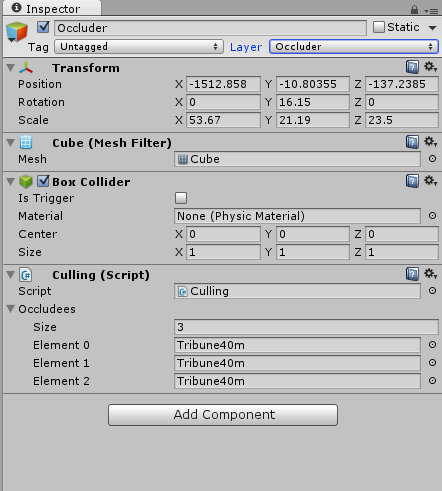
It's that simple. Make a game object with trigger collider, place the culling script, set it to Occluder layer and it should work. Main camera needs an other object with kinematic rigidbody, which copies the camera position and when that enters the occluder, it'll hide the given game objects or game objects' children. Easy to setup and works pretty well. just good positioning of the occluder is important.

Monday, 20 January 2014

LOD

Nope, it's not Lord of Destruction... Of course, I meant level of detail in the title. Currently I am testing a simple LOD system (for Unity Free) based on the one I found on Unity forums (Thanks to Westmark). I already made some modifications on it. I disable game objects with it which contains the meshes (instead of changing the mesh within the mesh renderer component). Also I'll make it more versatile, it'll be possible to set the distances for each details instead of the current system. Working well, but I have no idea about the memory usage yet. All the details have to be on the scene, but in a disabled state. So they are preloaded.

I am targetting mobile devices and mobiles / tablets has usually small screen and / or low resolution. Small screen / low resolution means, you can't see everything in a high detail. So it is possible to make the lower detail models much lower than on PC. Wheels will be very angular in the lowest detail, however they'll be detailed in highest detail and cockpit view. Probably the most simple car model will be around 500-600 triangles, the highest detail will be around 2500-3000 (tyres and driver included). I have no performance data yet, but I think, this LOD script is efficient.